I Claimed Three Businesses in ChatGPT's Business Hub. Here Is What Verification Asks For.
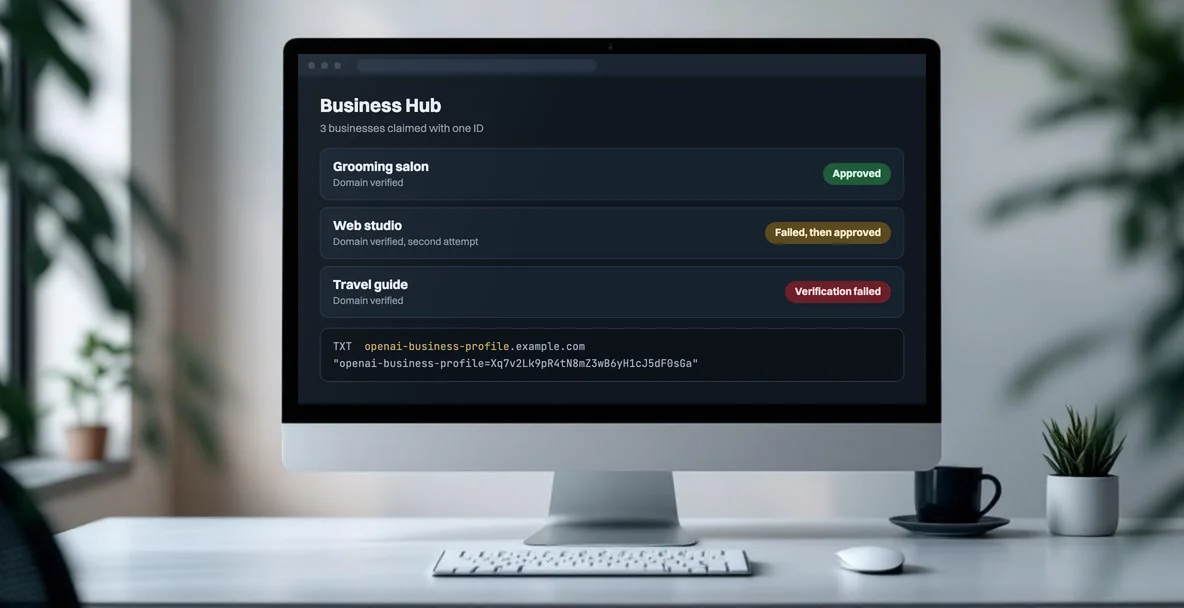
The day after it launched, I claimed three businesses in ChatGPT's new Business Hub. Same ID, same day. My wife's dog grooming salon in Lynchburg was approved. MySEODesk, my web and SEO studio, failed, then passed on a second try. My free Colombia travel guide, my busiest site at about 100,000 impressions a month, failed and still shows Verification failed. Here is what each step asked for, and what I would do differently.
OpenAI rolled the feature out on Tuesday, November 10, 2026, in beta, according to TechCrunch. Benji Shomair, OpenAI's VP of Monetization, said there are "multiple verification methods that we use for different types of business in different markets." TechCrunch reported that OpenAI did not share how verification works. The Help Center lists the methods but not what Persona checks, so this is what it looked like from the inside.
What ChatGPT Business Hub is and isn't
Business Hub lets you claim your business in ChatGPT, add business details and product info, and see insights such as mentions and website clicks, says OpenAI's Help Center article. It is not a magic ranking lever. The same article notes that claiming does not guarantee more visibility or control over ChatGPT's independent recommendations, and that advertising does not influence those independent answers.
Insights cover the past 28 days. For an online business, a mention counts only when ChatGPT references the website. The brand name alone does not count. Businesses never see individual prompts or conversations.
Local stores and restaurants can currently claim only an existing US listing. Business agents are limited to eligible ecommerce and online service businesses in the US with a website.
Step 1: claim your business
OpenAI offers several claim methods: business phone through SMS or an automated call, business email, website domain through a DNS TXT record, or Shopify. The methods shown depend on the business.
I used the DNS route for all three. There is no automatic connect like Google Search Console. You copy a token, add a TXT record, and wait for OpenAI's check. On Cloudflare the record was live on public DNS in about a minute. I could not continue until the domain checked out.
Mine looked like this. Copy the exact host and value ChatGPT shows you, because another domain I set up used a different prefix (openai-business-claim):
Host: openai-business-profile.yourdomain.com
Value: openai-business-profile=(token)
I did not test the phone or email routes.
Step 2: Persona identity verification
After the claim is approved, identity verification with Persona is required before you can publish changes, view insights, or create a business agent. The blue verified check only shows up after Persona approves you.
Persona asked for a government-issued ID, SSN or EIN, address, and a cell number with a 2FA code. An optional email got its own code. I had to repeat it for each business, all on one account. I ran it several times in one day.
Watch the phone step. My mom has not been able to verify her business yet. She is on Verizon with an SMS spam blocker, and my best guess is that it is stopping the code text. Before you start, check the phone's spam or unknown-senders filter and any message blocking on the carrier account. It is tempting to swap in a different cell just to get the code. I cannot prove it matters, but after two failures of my own I would keep the phone, the ID and the name all belonging to the same person.
Persona may also ask for business registration information and proof you are authorized to represent the business.
Why my first try failed and the second worked
| Business | Domain claim | Persona ID check | Where it stands |
|---|---|---|---|
| My wife's grooming salon | Passed | Approved first try | Live, verified |
| MySEODesk | Passed twice (new token on re-claim) | Failed, then approved with personal cell and EIN | Verified |
| Colombia travel guide | Passed | Failed | Shows Verification failed, no Try again |
Here is how it played out. The salon was approved. MySEODesk sat in review, then failed. The travel guide failed. The failures came back about 30 minutes after I submitted. The travel guide flipped to "Verification failed" in the Hub, and I have not seen an email for it. MySEODesk got an email that said, "We were unable to verify your identity for managing MySEODesk's business profile on ChatGPT."
A failed check showed no Try again button, no Contact support option, and no way to remove the failed business from the Hub. OpenAI's help article says only unpublished draft profiles can be deleted, and that Support cannot delete, unpublish, or hide a published profile as part of a setup or ownership request. The failed travel guide offered no remove option, so it still sits in my Hub marked Verification failed.
Re-claiming MySEODesk issued a new DNS token, so it is not one shot. On the second try I used my personal cell instead of the number on the website, and the business EIN instead of my SSN. It went through. I cannot prove which change mattered. I can only report the sequence.
After about four attempts I got a "too many attempts" notice. Space your retries out. If a Persona check fails, OpenAI says to follow the email, use Try again if available, make sure name, address, registration or tax number match official records, and contact support if you cannot retry. In my case neither option ever appeared.
Support is an AI chat. It told me Persona results cannot be manually overridden, that individuals can generally verify only one account or organization, and that verifying several businesses with one ID can trigger a block. I am presenting that as what the support bot said, not as policy. It sits awkwardly next to the help article's explanation that the admin who claimed a business can add teammates and grant an agency access, with each person using their own ChatGPT account.
Agencies and multi-business owners
If you run an agency, do not verify client businesses with your own ID. Have the owner, or someone at the business authorized to represent it, claim and verify it, then add you as an agency. That is the setup OpenAI documents, and given what the support bot told me, it is the safer path.
If you own multiple businesses, expect to repeat Persona for each one, as I did. Use the exact name and address on your government ID. Match the EIN or registration number to official records. Use a personal cell that can receive a 2FA code.
Is it worth the time? A pre-start checklist
Claiming does not guarantee more visibility. OpenAI says so in its own FAQ. My travel guide already gets ChatGPT traffic with no profile at all. Google Business Profile is still the priority for local visibility. If you want the bigger picture on getting cited by AI answers, I covered that in GEO vs SEO, and why more searches end without a click in my post on zero-click search.
Business Hub is worth a short session, not a weekend. The description box is capped at 300 characters. Picking a physical location put my listing on a waitlist; picking website did not. OpenAI documents no API for creating or updating profiles, unlike Google Business Profile, so I set each one up by hand.
Before you start, gather these:
- EIN or business registration handy.
- Personal cell phone that receives texts, with any SMS spam blocker checked first.
- Name and address exactly as they appear on your government ID.
- Plan to verify one business at a time, and wait for each review before starting the next.
- A physical location may put you on a waitlist. Mine did.
If you want help sorting out local SEO, ChatGPT profiles, or why your site already ranks in AI answers, send me a note. I'll be honest about whether this is the right place to spend your time.
